Magic Bookmark
by Yomu
A spoiler-free reading companion: a recap, a cast list and chat that stop at your exact page.
- Works with your own print book, audiobook or ebook
- Recap, cast and chat stop at your page
- Free to start, then $1.40 to $4.99 per book
- iPhone, iOS 16.4 or later
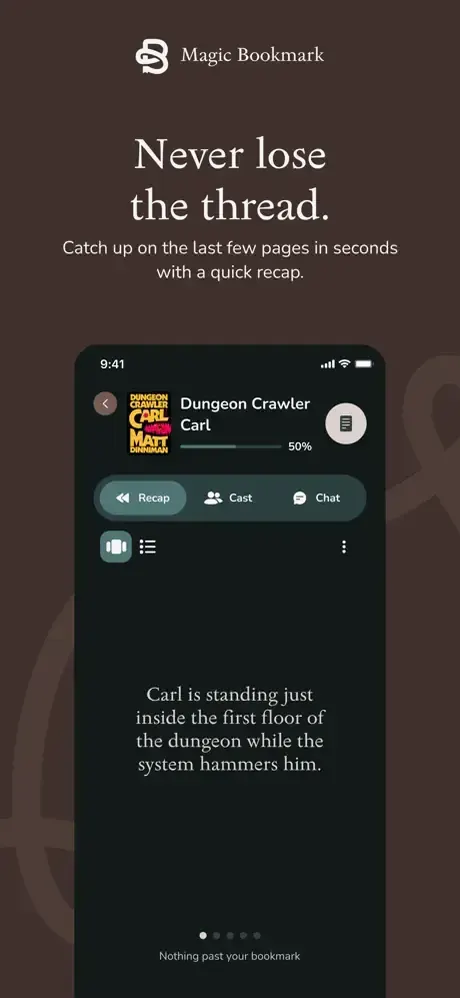
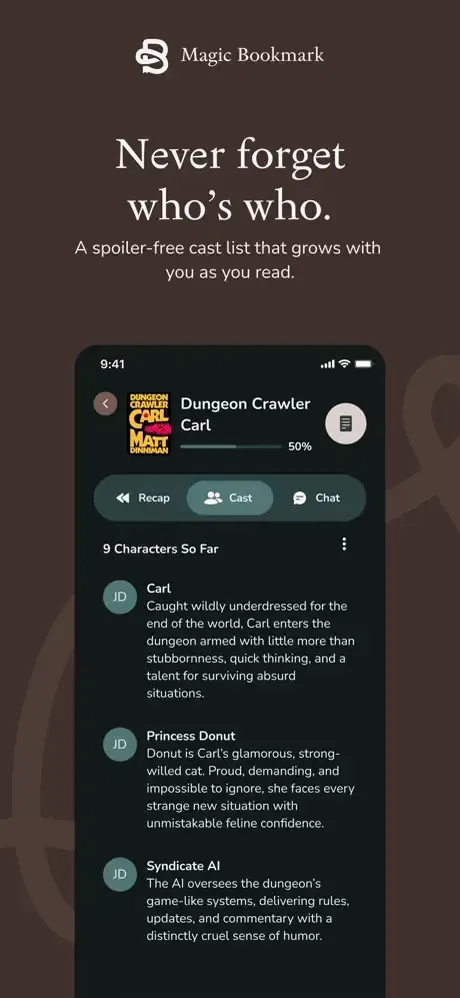
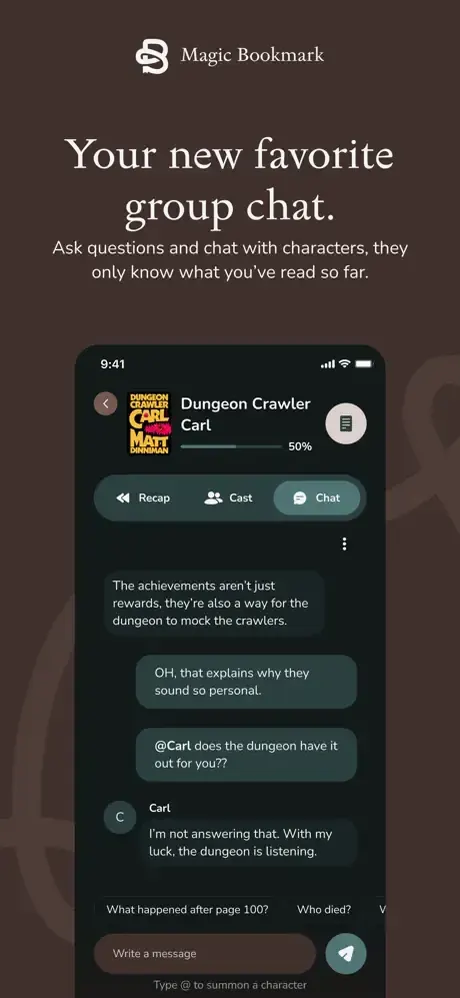
Screens: Magic Bookmark's App Store listing (Yomu Inc.)
Previously on your book: which recap app fits the way you read?
A book recap app catches you up on a book you have started and stops at your place, so nothing ahead is spoiled. Store features come with eligible copies: Kindle's Story So Far for Kindle ebooks in the US, Google Play Books' Catch me up for Play ebooks, Spotify's Recaps for Spotify audiobooks. For paperbacks, library books, other ebooks and audiobooks from any app, on iPhone, Magic Bookmark recaps up to your exact page for its supported titles. Chatbots and fan wikis cover any book, but neither stops at your page.
Tonight's lineup
- 4.02Which book recap app should you use: Magic Bookmark, Kindle, Google Play Books, Spotify, a chatbot or a wiki?Choose by the copy in your hands.7 min
- 4.01What is a book recap app?A book recap app catches you up on a book you have already started, telling you what has happened so far and stopping at your place so nothing ahead is spoiled.7 min
- 4.05How do you catch up on a series before the sequel, without spoilers?Get a recap of the previous book only, reread its last chapter yourself, write a short cast list of who matters and where they stand, and note the open questions.4 min
- 1.01How does Magic Bookmark recap your book up to your exact page?Magic Bookmark is an iPhone app from Yomu Inc.11 min
- 2.02What are Kindle Recaps and Story So Far?They are two Amazon features for Kindle ebooks in the US.4 min
- 5.01Which reading apps can recap a book only up to where you are?Four of the 30 apps we checked publish a recap that is limited to what you have already read or heard: Magic Bookmark, Kindle (Story So Far), Google Play Books (Catch me up) and Spotify (audiobook Recaps).
What's on which device
| Row | Audio | Kindle ebook | Other ebook | |
|---|---|---|---|---|
| iPhone | Magic Bookmark | Magic Bookmark; Spotify Recaps (Spotify audiobooks) | Kindle (US), Magic Bookmark | Magic Bookmark; Google Play Books (Play ebooks) |
| Kindle | None | None | Kindle (US) | None |
| Android | None listed | Spotify Recaps (Spotify audiobooks, since 15 Apr 2026) | Kindle Recaps on web (US) | Google Play Books (Play ebooks) |
| Web | None | None | Kindle Recaps (US) | Google Play Books (Play ebooks) |
Place-limited options only, supported or eligible titles. Spotify Recaps launched as an iOS beta in November 2025 and have been on Android since 15 April 2026. Checked 4 Nov 2026.
The full listings grid
Every recap option on one grid, by format and device. The feature matrix has every feature.
| Feature | Magic Bookmark | Kindle Story So Far | Kindle Recaps | Kindle Ask this Book | Google Play Books Catch me up | Spotify Recaps | Chatbots | Fan wikis |
|---|---|---|---|---|---|---|---|---|
| Recap of the book you are reading | Yes | Yes | No | Answers questions | Yes | Yes (audio summary) | On request | No |
| Refresher for a finished book | Set to last page | No | Yes | Whole-book option | Not stated | Not stated | On request | Yes |
| Stops at your place | Exact page | Yes | Books you finished | By default | Reading position | Portion you heard | No lock | No |
| Finds your place | Photo, page number, last phrase | Kindle position | Your library | Kindle position | Play Books position | Spotify listening position | What you type | No |
| Cast list | Yes, only people you have met | Characters in recap | Characters in recap | On request | No; highlight a name and ask | No | On request | Whole series |
| Ask questions | Yes | No | No | Yes | Yes (Ask Play Books) | No | Yes | No |
| Chat with characters | Yes, @ a character | No | No | No | No | No | On request, no lock | No |
| Print books | Yes | No | No | No | No | No | You describe it | Yes |
| Audiobooks | Yes (since 21 Oct 2026) | No | No | No | No | Yes, Spotify audiobooks | You describe it | Yes |
| Kindle ebooks | Yes | Yes | Yes | Yes | No | No | You describe it | Yes |
| Other ebooks | Yes | No | No | No | Google Play ebooks | No | You describe it | Yes |
| iPhone | Yes (iOS 16.4+) | Yes | Yes | Yes | Yes | Yes | Yes | Yes |
| Android | Roadmap | Not listed | Not listed | Announced | Yes | Yes (since 15 Apr 2026) | Yes | Yes |
| Kindle e-reader | No | Yes | Yes | Announced | No | No | No | No |
| Web | No | Not listed | Yes | Not listed | Yes (web reader) | Not stated | Yes | Yes |
| Titles | Supported list | Thousands of popular fiction titles | Thousands of best-sellers | Thousands of best-sellers | Select English ebooks (1M+ per Google) | Select English audiobooks | Any | Any with a wiki |
| Region | US App Store listing | US | US | US | Not limited on Google's pages | Not stated | Varies | Anywhere |
| Price | Free start, then $1.40 to $4.99 per book | No separate charge | No separate charge | No separate charge | No separate charge | No separate charge listed | Free plans; paid from $4.99 a month | Free |
Sources: Magic Bookmark App Store listing and website; About Amazon; Google Play Help and Google blog (16 Jun and 2 Sep 2026); Spotify Newsroom (13 Nov 2025 and 15 Apr 2026) and Spotify Support; OpenAI, Anthropic and Google plan pages; Fandom.
On the dial
- 2.01What is Magic Bookmark, and who is it for?
- 2.02What are Kindle Recaps and Story So Far?
- 2.03What is Kindle Ask this Book?
- 2.04Can a general chatbot work as a book recap app?
- 2.05Are fan wikis a safe way to recap a book?
- 2.06What is Google Play Books' Catch me up, and who is it for?
- 2.07What are Spotify's audiobook Recaps, and who are they for?
- 4.01What is a book recap app?
- 4.02Which book recap app should you use: Magic Bookmark, Kindle, Google Play Books, Spotify, a chatbot or a wiki?
- 4.03Which book recap app works with your format: print, ebook or audiobook?
- 4.04Which book recap apps work on your device?
- 4.05How do you catch up on a series before the sequel, without spoilers?
- 4.06How do you get back into a long series you left years ago?
- 4.07What is the difference between a book recap and a book summary?
- 4.08How do you avoid spoilers for a book you are still reading?
- 4.09Should you reread the previous book before a sequel, or read a recap?
- 4.10How do you use a fan wiki without getting spoiled?
- 4.11How do you catch up on an audiobook you stopped listening to?
- 4.12What do you do when no recap app covers your book?
- 4.13How do you tell a recap app exactly where you are in a book?
- 4.14Can you get a Story So Far recap for a paperback or an audiobook?
- 4.15Which recap apps help with long fantasy and romantasy series?
- 4.16How do you pick up a library book again after the loan ran out?
- 4.17What are the alternatives to Kindle Story So Far in 2026?
- 4.18Recap site, fan wiki or recap app: which is safest before a sequel?
- 4.19Reading Iron Flame next? How do you catch up on Fourth Wing without spoilers?
- 4.20How do you refresh Fourth Wing and Iron Flame before Onyx Storm without spoilers?
- 4.21How do you catch up on Throne of Glass mid-series without spoilers?
- 4.22Is there a free book recap app?
- 7.01How much do book recap apps cost?
- 7.02How do you check that a recap or lookup will not spoil your book?
- 7.03What should you write down before starting a sequel?
- 7.04Which book recap tool has which features?
- 7.05When did book recap apps arrive? A dated timeline
- 7.08What does it cost to recap a whole series with Magic Bookmark?
- 7.06What do book recap terms mean? A glossary
- 7.07Book recap apps: frequently asked questions
- 9.01Is Magic Bookmark free to try? Its website and App Store listing now say different things
- 9.02Can you now get a spoiler-free recap of an audiobook in Magic Bookmark?
- 9.03What did Magic Bookmark 1.0.10 add?
- 9.09Can you now get a Catch me up recap in Google Play Books on iPhone?
- 9.04When did Magic Bookmark launch, and what did it launch with?
- 9.05Can you use Kindle Recaps in a web browser?
- 9.06Why did the Authors Guild object to Kindle's Ask this Book?
- 9.07When did Kindle Ask this Book launch, and how do you use it?
- 9.10What are Spotify's audiobook Recaps, and where do they stand now?
- 9.08What did Amazon launch with Kindle Recaps?
Latest bulletins
- Is Magic Bookmark free to try? Its website and App Store listing now say different things
On 30 October 2026, Magic Bookmark's website FAQ described "a two-week free trial: unlimited books, no credit card, and nothing auto-renews," after which one Bookmark Credit covers one book. The App Store listing, read the same day, still said "Your first credit is free." Paid prices are unchanged at $4.99 for one book down to $1.40 a book in a 50-pack.
- Can you now get a spoiler-free recap of an audiobook in Magic Bookmark?
Yes, for supported titles. Magic Bookmark's App Store version history shows the note "Now with audiobook support: get spoiler-free recaps for any book format" first on version 1.1, released on 21 October 2026, and again on 1.1.1 on 27 October. You enter the last phrase you heard in any audiobook app and it finds that place in the story. It joins Spotify's Recaps, which cover audiobooks played in Spotify.
- What did Magic Bookmark 1.0.10 add?
A new flow for finishing a book. The release note for version 1.0.10, released on the US App Store on 19 October 2026, reads: "Finished a book? There's a new flow for wrapping it up and moving on to your next read. Plus bug fixes." Two days later, version 1.1 added audiobook support. (An earlier version of this bulletin dated the finished-book flow to 1.1; Apple's version history shows it on 1.0.10.)
- Can you now get a Catch me up recap in Google Play Books on iPhone?
Yes. On 2 September 2026 Google said Book insights, the Play Books reading companion that includes the Catch me up recap, had reached the Play Books iOS app and more than a million English-language ebooks. It launched on 16 June 2026 for the Android app and the web reader. It still works only inside eligible Play Books ebooks.
Questions
- Q1
What is a book recap app?
An app or feature that catches you up on a book you have started, covering what has happened so far and stopping at your place so nothing ahead is spoiled.
- Q2
Which book recap app is best?
It depends on your copy. Kindle Story So Far for Kindle ebooks in the US, Catch me up for Google Play ebooks, Recaps for Spotify audiobooks, and Magic Bookmark for print, other ebooks and any audiobook app on iPhone, for supported titles. We list tools without ranking them.
- Q3
Are book recap apps free?
Kindle's, Google Play Books' and Spotify's recap features come with eligible copies at no separate charge. Magic Bookmark is free to start, then $1.40 to $4.99 per book. Fan wikis are free but not spoiler-safe.
- Q4
Do recap apps work with paperbacks and audiobooks?
Magic Bookmark does, for supported titles, using a photo of the page, the page number or the last phrase you heard. Spotify's Recaps cover audiobooks played in Spotify. Kindle's and Google's features only work inside their own ebooks.
Sources
- Magic Bookmark: Book Recaps (listing, version history, in-app purchases, privacy label). Apple App Store (US), read .
- Magic Bookmark website (how it works, pricing, FAQ). Yomu Inc., read .
- How Kindle helps you stay immersed in every book you read (published 2 April 2025, updated 2 July 2026). About Amazon, read .
- Spotify Expands Audiobook Features (15 April 2026, "Recaps are now on Android"). Spotify Newsroom, read .